
Sep 10, 2026Product & Industry Knowledge
How to Choose a Battery Swapping Station Manufacturer: B2B Buyer’s Guide
Learn how to choose a battery swapping station manufacturer by evaluating battery compatibility, cabinet design, charging, BMS, software, safety, network management and after-sales support.
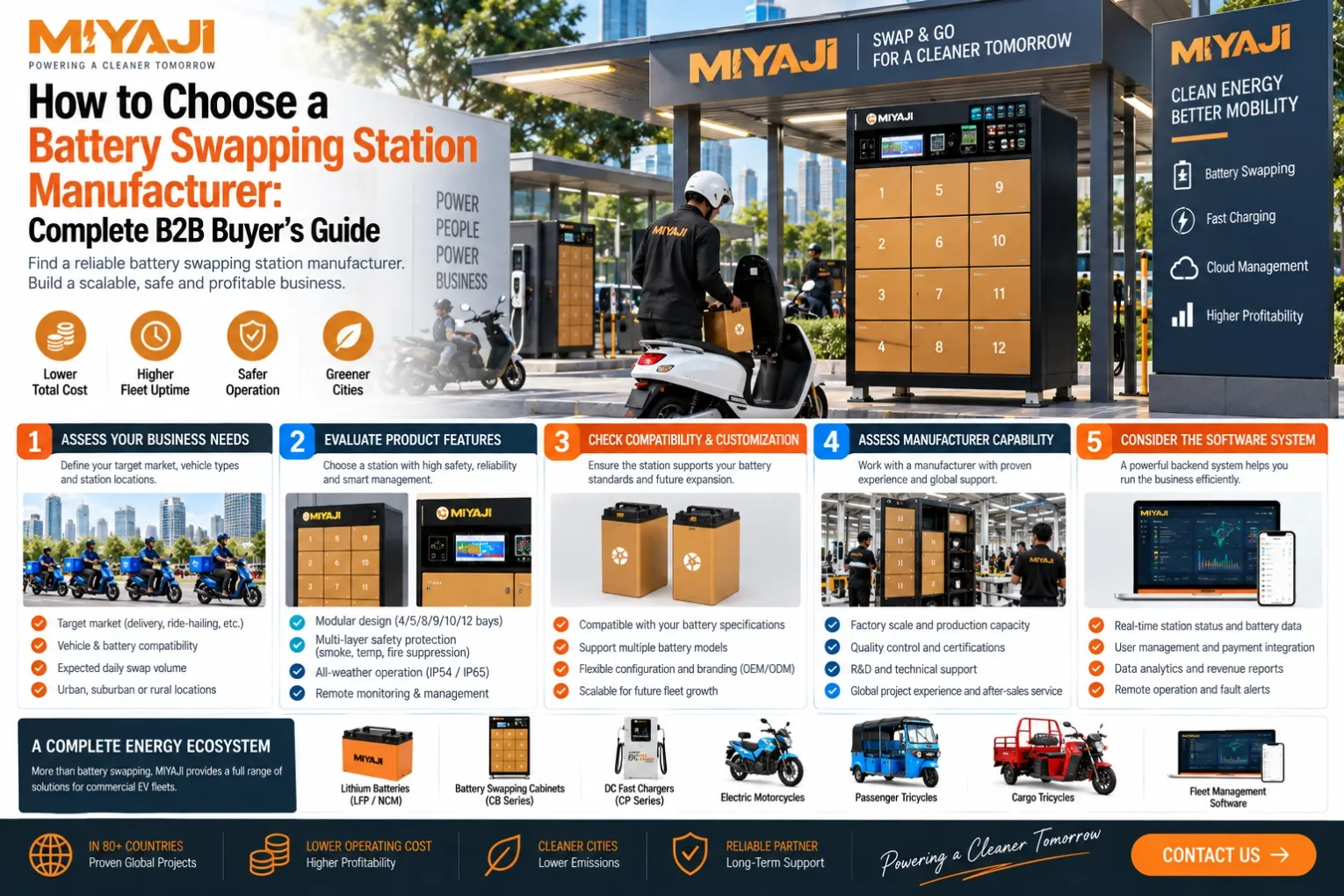
How to Choose a Battery Swapping Station Manufacturer: Complete B2B Buyer’s Guide
Choosing a battery swapping station manufacturer is not the same as buying a metal cabinet with charging slots.
Vehicle
-
Battery
-
Swap Station
-
Charging
-
BMS
-
Software
-
Network Operations
If any of these layers are poorly integrated, the project can face:
- Battery incompatibility
- Slow charging turnaround
- Poor station availability
- Software failures
- Safety risks
- Rider inconvenience
- Difficult maintenance
This means a buyer should not ask only:
How much does your battery swap cabinet cost?
A better question is:
Can this supplier support a complete, scalable battery swapping system?
This guide explains how fleet operators, distributors and mobility project buyers can evaluate a battery swapping station manufacturer.
1. First Define Your Battery Swapping Project
Before comparing suppliers, define the operating model.
Ask:
- What vehicles will use the system?
- How many vehicles initially?
- What is the future fleet size?
- How many swaps per vehicle per day?
- Where will stations be located?
- Who owns the batteries?
- Who pays for swaps?
- Will batteries be charged only inside stations?
- Is fast charging also required?
A good supplier should ask these questions before recommending hardware.
2. Battery Swapping Station vs Battery Swap Cabinet
These terms are often used interchangeably.
A battery swap cabinet generally refers to the physical cabinet that stores and charges batteries.
A battery swapping station can refer to the broader operating point including:
- Cabinet
- Batteries
- Charging
- User access
- Software
- Network connection
For commercial projects, the complete system matters more than terminology.
3. Start With the Battery, Not the Cabinet
One of the biggest mistakes is choosing the cabinet first.
The battery affects:
- Slot dimensions
- Connector
- Charging voltage
- Charging current
- Cooling
- Communication
- Weight
- Swap ergonomics
The correct design order is usually:
Vehicle Requirements
↓
Battery Architecture
↓
Swap Process
↓
Station Design
↓
Software
4. Check Battery Compatibility
Ask the manufacturer:
- What battery voltage does the station support?
- What battery dimensions?
- What connector?
- What communication protocol?
- What BMS?
- What chemistry?
- What charging current?
The cabinet must match the specific battery system.
5. Standardized Battery Architecture
Battery swapping becomes easier to scale when vehicles use standardized battery modules.
Standardization can reduce:
- Battery SKUs
- Station complexity
- Spare-parts complexity
- Charging configuration differences
Fleet buyers should consider standardizing batteries across multiple vehicle models where practical.
6. Battery Size and Weight
A battery may fit electrically but still be unsuitable for swapping.
Consider:
- Weight
- Handle position
- Insertion angle
- User height
- Swap frequency
The physical swap process should be tested with real users.
7. Manual vs Assisted Battery Swapping
Smaller motorcycle batteries may be manually swapped.
Larger batteries may require:
- Modular packs
- Roll-in designs
- Mechanical assistance
- Automated mechanisms
The manufacturer should match the swap mechanism to battery weight and use case.
8. Evaluate the Battery Cell
Ask what cells are used.
Important factors can include:
- Chemistry
- Cell format
- Capacity
- Current capability
- Charging capability
- Supply consistency
- Traceability
Do not evaluate only cell brand.
The specific cell model and PACK design matter.
9. LFP vs NMC for Battery Swapping
Both chemistries can be used.
LFP may be attractive when priorities include:
- Frequent cycling
- Commercial durability
- Thermal-stability characteristics
- Cost considerations
NMC may be attractive when priorities include:
- Lower battery weight
- Higher energy density
- Limited vehicle packaging space
There is no universal best chemistry.
10. Check the BMS
The BMS is a critical part of a swapping system.
Depending on the project, it may manage:
- Voltage
- Current
- Temperature
- SOC
- SOH
- Faults
- Battery ID
- Communication
The station and software need access to the relevant battery information.
11. Battery Identification
Each battery should ideally have a unique identity in a commercial swapping network.
This allows the operator to know:
- Which battery is in which vehicle
- Which battery is in which station
- Which battery is charging
- Which battery has a fault
- Which battery has been swapped
Without asset-level tracking, large battery pools become difficult to manage.
12. Battery Authentication
Some systems may require battery authentication before charging or release.
This can help prevent:
- Incorrect batteries
- Unauthorized batteries
- Incompatible packs
The exact implementation depends on system architecture.
13. Evaluate the Charging System
A swap station is fundamentally also a multi-battery charging system.
Ask:
- Charging power per slot?
- Maximum station power?
- Charging algorithm?
- Communication with BMS?
- Power allocation?
- Temperature monitoring?
The answers should match the battery specification.
14. Charging Time Matters
The station needs to recharge batteries fast enough to support demand.
A simplified relationship is:
Battery Turnaround Time → Ready Battery Availability
If batteries charge too slowly relative to swap demand, the operator may need:
- More batteries
- More charging capacity
- More stations
15. Maximum Charger Power Is Not Enough
A supplier may advertise:
High-Power Charging
But ask:
- Can the cell accept it?
- Can the BMS support it?
- Is heat managed?
- Is site power sufficient?
The complete charging system should be evaluated.
16. Dynamic Charging Power
Some systems can distribute available power between battery slots.
For example, if total station power is limited, the system may prioritize batteries based on:
- SOC
- Demand
- Required readiness
- Battery condition
This can improve energy utilization.
17. Evaluate Station Slot Quantity
More slots do not automatically mean a better station.
The correct number depends on:
- Fleet size
- Swaps/day
- Peak swaps
- Charging time
- Battery inventory
- Location demand
A 12-slot station may outperform a larger station if it is better located and utilized.
18. Slot Quantity vs Battery Inventory
Do not assume:
10-slot cabinet = 10 batteries needed
The total project battery pool may include:
- Batteries in vehicles
- Batteries charging
- Ready batteries
- Reserve batteries
- Maintenance batteries
The station is only one part of inventory planning.
19. Check Station Mechanical Design
Evaluate:
- Cabinet material
- Door structure
- Locks
- Hinges
- Battery guides
- Internal layout
- Cable routing
Commercial stations may be opened and closed many times every day.
Mechanical durability matters.
20. Outdoor Protection
If stations are installed outdoors, evaluate protection against:
- Rain
- Dust
- Heat
- Humidity
- Sun exposure
Ask for the actual protection design and applicable component ratings.
Do not assume the entire system has the same IP rating.
21. Temperature Control
Battery charging can generate heat.
Depending on station design and environment, thermal management may include:
- Ventilation
- Fans
- Airflow design
- Active cooling
The appropriate solution depends on:
- Battery
- Charger power
- Cabinet design
- Climate
22. Fire Detection and Protection
Ask how the station handles abnormal battery conditions.
Possible safety layers may include:
- Temperature monitoring
- Smoke detection
- Electrical isolation
- Charging shutdown
- Fire detection
- Fire suppression mechanisms
The exact configuration should be verified with the supplier.
23. Electrical Protection
The station should include appropriate electrical protection.
Depending on design, this may include:
- Overcurrent protection
- Short-circuit protection
- Leakage protection
- Surge protection
- Emergency shutdown
Ask the manufacturer to explain the electrical protection architecture.
24. Battery Fault Isolation
If one battery becomes abnormal, the system should be designed to limit the impact on the rest of the station.
Ask:
Can an individual charging slot be isolated?
This can be important for maintaining station availability.
25. Emergency Stop
For commercial installations, emergency shutdown functions may be appropriate depending on station design and local requirements.
Ask:
- What happens after emergency stop?
- Which systems shut down?
- How is the station restarted?
Operational procedures matter as much as the button itself.
26. User Access
Battery swapping systems may support:
- QR code
- RFID
- NFC
- App
- Account-based access
The correct method depends on the business model.
27. Swap Process
A commercial swap process should be simple.
A typical flow might be:
User Identified
↓
Battery Returned
↓
Battery Checked
↓
Charged Battery Released
↓
Transaction Recorded
The exact logic depends on system design.
28. What Happens When a Faulty Battery Is Returned?
This is an important question.
The station may need to:
- Detect the battery
- Refuse charging
- Lock the battery
- Send an alert
- Flag it for maintenance
Ask the supplier how abnormal batteries are handled.
29. Software Is Not Optional for a Network
A single demonstration cabinet may operate with basic controls.
A commercial network needs visibility across:
- Batteries
- Stations
- Users
- Swaps
- Charging
- Faults
This requires software.
30. Station Monitoring
Operators should be able to monitor:
- Station online/offline
- Door status
- Slot status
- Battery inventory
- Charging
- Faults
This reduces the need for physical inspection of every station.
31. Battery Monitoring
Useful battery data may include:
- SOC
- SOH
- Temperature
- Voltage
- Fault state
- Location
- Charging status
The actual data depends on BMS integration.
32. Swap Transaction Records
The platform should be able to record information such as:
- User
- Vehicle
- Returned battery
- Released battery
- Station
- Time
This supports operations and asset tracking.
33. User Management
Depending on the business model, users may include:
- Fleet drivers
- Independent riders
- Delivery riders
- Dealers
- Franchise operators
The software should support the appropriate account structure.
34. Payment and Subscription
Commercial models may include:
- Subscription
- Pay-per-swap
- Energy-based payment
- Fleet contract
- BaaS
The software may handle billing directly or integrate with external payment systems.
35. White-Label Software
Some operators and distributors want:
- Their own logo
- Brand colors
- Domain
- App
- Language
Ask early if white-label software is required.
36. API Capability
A commercial project may need integration with:
- Payment systems
- Fleet software
- ERP
- Delivery platform
- Mobile apps
API capability becomes increasingly important as the project scales.
37. Offline Operation
Ask:
What happens if the network connection is temporarily unavailable?
Possible questions include:
- Can the station still operate?
- Can authorized users still swap?
- Is data stored locally?
- Does it synchronize later?
This can be important in some operating environments.
38. Remote Diagnostics
Remote diagnostics can help operators identify:
- Communication faults
- Charger faults
- Slot problems
- Software issues
This can reduce maintenance response time.
39. Over-the-Air Updates
Where supported, remote software or firmware updates can reduce the need for physical service visits.
But ask:
- What can be updated?
- How is update failure handled?
- Who controls updates?
Change management is important.
40. Fleet Integration
Battery swapping should not operate separately from the fleet where integration is useful.
An integrated system can connect:
Vehicle
↔ Battery
↔ Station
↔ Fleet Platform
This enables more complete operational data.
41. Vehicle Compatibility
The supplier should understand the vehicle-side battery interface.
Ask about:
- Battery compartment
- Locking
- Connector
- Communication
- Vehicle controller
- BMS interaction
A swap station alone cannot guarantee vehicle compatibility.
42. Test the Complete System
Do not only test the cabinet.
Test:
Vehicle
-
Battery
-
Station
-
Software
as one system.
This can reveal issues that individual component testing misses.
43. Battery Swap Cycle Testing
The battery and mechanical interfaces should tolerate repeated use.
Relevant areas include:
- Connector wear
- Locking mechanism
- Handles
- Battery enclosure
- Cabinet guides
Repeated swapping creates mechanical wear.
44. Connector Durability
The connector experiences frequent:
- Insertion
- Removal
- Current transfer
Ask:
- Rated mating cycles?
- Maintenance requirements?
- Replacement method?
- Environmental protection?
Connector design can influence long-term reliability.
45. Network Planning Capability
A good battery swapping supplier should be able to discuss more than hardware.
Ask whether they can help with:
- Station location
- Battery quantity
- Station capacity
- Peak demand
- Fleet sizing
This indicates whether the supplier understands operations.
46. Location Planning
Station locations should be chosen according to:
- Rider routes
- Vehicle density
- Demand
- Site power
- Accessibility
- Operating hours
Installing stations simply where rent is cheap may produce poor utilization.
47. Pilot Deployment
A new project should usually validate the system before large-scale deployment.
A pilot can test:
- Swap demand
- Battery consumption
- Station reliability
- Charging time
- Software
- User experience
Use real riders and routes.
48. Pilot KPIs
Track:
- Swaps/day
- Peak swaps/hour
- Ready battery availability
- Battery charging time
- Station uptime
- Battery faults
- User swap time
These metrics can guide scaling.
49. From Pilot to Network
A sensible path can be:
Pilot
↓
Measure
↓
Optimize Battery / Station Ratio
↓
Standardize
↓
Expand Locations
↓
Avoid deploying a large network before the operating model is validated.
50. Factory Capability
When evaluating a manufacturer, inspect:
- Station assembly
- Wiring
- Charging modules
- Testing
- Software integration
- QC
If the supplier also provides batteries, inspect battery-related capability as well.
51. Ask Who Develops the Software
Possible structures include:
- In-house software team
- Strategic technology partner
- Third-party platform
None is automatically wrong.
But buyers should know:
- Who maintains the platform?
- Who handles bugs?
- Who controls updates?
- Who supports API integration?
52. Ask Who Controls the Battery System
Likewise, identify:
- Who selects cells?
- Who designs PACK?
- Who configures BMS?
- Who handles battery faults?
A project can become difficult if responsibility is fragmented across unrelated suppliers.
53. Change Control
Once the system is approved, changes to:
- Cell
- BMS
- Connector
- Charger
- Communication
should be controlled.
One component change can affect system compatibility.
54. Spare Parts
Ask for spare parts covering:
- Charging modules
- Locks
- Connectors
- Fans
- Communication modules
- Electrical protection components
The recommended list depends on station design.
55. Maintenance
Ask the supplier to define:
- Routine maintenance
- Cleaning
- Inspection
- Replacement parts
- Fault procedures
Stations are infrastructure assets and require maintenance.
56. Local Technician Training
For multi-station networks, operators should usually develop local maintenance capability.
Training may include:
- Station electrical system
- Charging modules
- Battery faults
- Software
- Communication
- Component replacement
This can reduce downtime.
57. Warranty
Do not ask only:
How many years warranty?
Ask:
- What components are covered?
- What is excluded?
- Who pays freight?
- How are failed parts diagnosed?
- What is the replacement process?
Warranty conditions matter more than a headline duration alone.
58. Compare Quotations Correctly
Two cabinets that look similar may include very different systems.
Compare:
Area | Supplier A | Supplier B | Supplier C |
|---|---|---|---|
Battery Compatibility | | | |
Slot Quantity | | | |
Charging Power | | | |
BMS Communication | | | |
Battery Identification | | | |
Temperature Monitoring | | | |
| | | |
IoT | | | |
Software | | | |
Payment | | | |
API | | | |
White Label | | | |
Remote Diagnostics | | | |
Spare Parts | | | |
Warranty | | | |
Do not compare only cabinet price.
59. Calculate Total System Cost
A battery swapping project can include:
Stations + Batteries + Software + Electrical Infrastructure + Installation + Site Costs + Operations
In many projects, batteries can represent a major part of the investment.
Therefore:
60. Evaluate Cost per Swap
A useful commercial metric is:
Total Operating Cost ÷ Number of Successful Swaps
The complete calculation may include:
- Electricity
- Battery depreciation
- Station depreciation
- Site cost
- Software
- Maintenance
- Staff
61. Evaluate Station Utilization
A technically good station can still be a poor investment if hardly anyone uses it.
Useful metrics include:
- Swaps/day
- Swaps/slot
- Revenue/station
- Battery utilization
Location and fleet density matter.
62. Avoid Buying Too Many Stations Too Early
A project can waste capital by installing a large number of low-utilization stations.
Instead:
Start with demand → validate → expand.
Infrastructure should follow actual usage.
63. Avoid Buying Too Few Batteries
This can lead to:
- Empty ready slots
- Rider waiting
- Poor service
Battery quantity should be planned with charging time and peak demand.
64. Supplier Red Flags
Investigate further if a supplier:
- Only discusses cabinet appearance
- Cannot explain battery compatibility
- Cannot explain BMS communication
- Cannot explain charging logic
- Has no real software platform
- Cannot show battery-level tracking
- Cannot explain fault handling
- Cannot support pilot sizing
- Avoids system testing
- Changes components without notice
A battery swapping project requires system engineering.
65. What Should Fleet Operators Prioritize?
Fleet operators should focus on:
Uptime
Ready Battery Availability
Swap Speed
Battery Reliability
Software
Maintenance
Cost per km / swap
66. What Should Battery-Swap Operators Prioritize?
Independent network operators may additionally prioritize:
- Station utilization
- Battery utilization
- User accounts
- Billing
- Multi-station management
- Network expansion
67. What Should Distributors Prioritize?
Distributors may care about:
- Product standardization
- White label
- Local language
- Spare parts
- Technical training
- Local market adaptation
68. What Should OEM / Mobility Partners Prioritize?
Larger partners may prioritize:
- API
- System ownership
- Data access
- Custom software
- Battery standardization
- Vehicle integration
These requirements should be defined early.
Battery Swapping Station Manufacturer Checklist
Before choosing a supplier, verify:
Battery
Chemistry / Cell / PACK / BMS / ID / Connector
Station
Slots / Charging / Mechanical Design / Protection
Safety
Temperature / Smoke / Electrical Protection / Fault Isolation
Software
Station / Battery / User / Transaction / Alerts
Business
Payment / Subscription / BaaS
Integration
Vehicle / Battery / Station / API
Deployment
Sizing / Location / Pilot / Scaling
Support
QC / Spare Parts / Training / Warranty
If one of these layers is missing, understand who is responsible for it.
How MIYAJI Approaches Battery Swapping Projects
MIYAJI approaches battery swapping as a complete commercial energy system rather than a standalone cabinet.
Depending on project requirements, the system can integrate:
Electric Motorcycles & Tricycles
-
Swappable Lithium Battery Systems
-
-
Battery Swap Stations
-
Charging Systems
-
The project can be planned around:
- Vehicle type
- Daily mileage
- Fleet size
- Battery capacity
- Swap frequency
- Station locations
- Charging capacity
- Business model
- Future network scale
This helps ensure the battery, station, charging and software layers are designed to work together.
Looking for a Battery Swapping Station Manufacturer?
Prepare:
Target Country / City
Vehicle Type
Initial Fleet Size
Future Fleet Size
Daily Mileage
Battery Voltage & Capacity
Swaps per Vehicle per Day
Battery Ownership Model
Station Locations
Available Site Power
Payment Model
Software / API Requirements
White-Label Requirements
With these inputs, the project can be evaluated across:
Vehicle
→ Battery
→ Station
→ Energy
→ Software
→ Network Economics
Discuss Your Battery Swapping Project
Frequently Asked Questions
How do I choose a battery swapping station manufacturer?
Evaluate battery compatibility, BMS integration, charging, cabinet design, safety, software, network management, spare parts and project-support capability.
Is a battery swap cabinet the same as a battery swapping station?
A cabinet is the physical battery storage and charging hardware, while a battery swapping station can refer to the broader system including batteries, software, user access and network operations.
What should I check before buying a battery swapping station?
Confirm battery voltage, dimensions, connector, BMS protocol, charging requirements, slot quantity, station power, safety functions and software compatibility.
Can one battery swapping station support different motorcycles?
Potentially, but the vehicles need compatible battery architecture, mechanical interfaces and communication. Standardization usually makes the network easier to operate.
How many batteries does a battery swapping station need?
There is no universal ratio. Battery inventory depends on fleet size, swap frequency, charging time, peak demand and station capacity.
How many battery swap stations does a fleet need?
Station quantity depends on fleet geography, rider routes, peak demand, station capacity and target service availability.
What software is needed for battery swapping?
A commercial network may require battery tracking, station monitoring, user management, swap records, billing, alerts and operational analytics.
Can battery swapping stations support LFP and NMC batteries?
Yes, if the station's charging and control system is designed for the specific battery chemistry and configuration.
Is battery swapping safer than charging?
Neither approach is universally safer. Safety depends on battery design, BMS, charging control, station protection, installation, maintenance and operating procedures.
Should I start with a battery swapping pilot?
For a new market or operating model, a pilot can help validate demand, battery quantity, station capacity, charging time, software and user experience before scaling.
Can MIYAJI support a complete battery swapping project?
MIYAJI can support project configurations involving vehicles, swappable batteries, BMS, swap stations, charging and fleet/energy management software according to project requirements.