Oct 10, 2026Product & Industry Knowledge
Battery Swapping Cabinet Compatibility: Beyond Physical Fit
A battery that fits a swapping cabinet may still be incompatible. Learn about connectors, BMS communication, charging control and operating software.
Why Can a Battery Fit Inside a Swapping Cabinet but Still Fail to Work?
MIYAJI Commercial Battery Insights — Part 8
You have selected a battery for your electric motorcycle fleet. Its dimensions fit the swapping cabinet, and the connector appears compatible.
Yet when the battery is inserted, the cabinet does not recognise it—or recognises it but does not start charging.
This does not automatically mean either product is defective. The battery and cabinet may be individually functional while their interfaces or operating rules are incompatible.
For a commercial swapping project, physical fit is only one part of compatibility. The battery, charging equipment, cabinet controller and management software need to complete an agreed operating sequence.
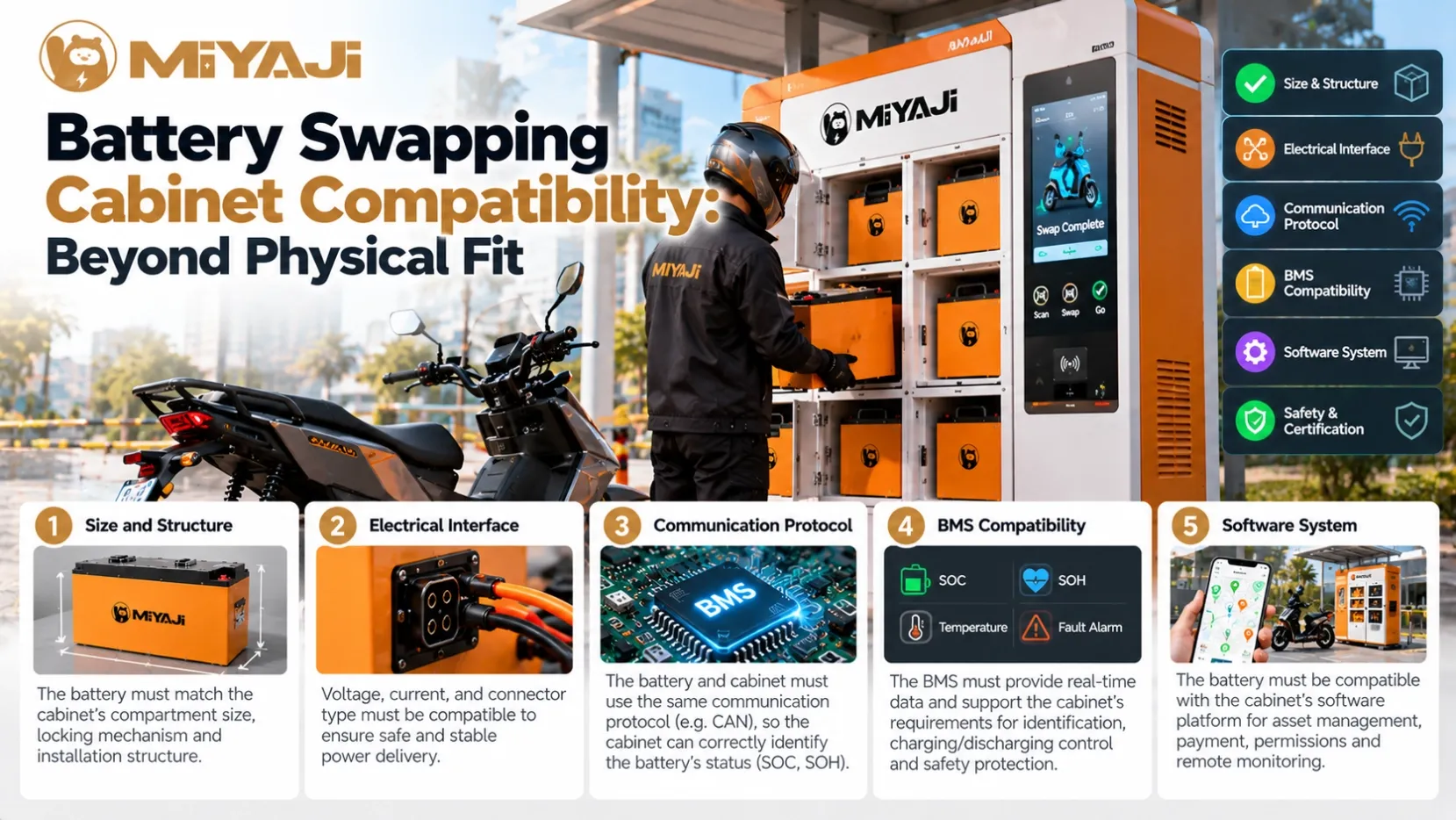
1. Physical Fit Must Include Correct Engagement
A battery can fit inside a compartment without connecting correctly.
Connector position, insertion depth, guides, manufacturing tolerances and locking features all affect engagement. A partly engaged connector may produce intermittent communication or poor electrical contact.
Mechanical checks should cover:
- Battery dimensions and weight.
- Handle clearance and insertion direction.
- Connector alignment and engagement.
- Support inside the compartment.
- Locking or retention, where used.
- Repeated insertion and removal.
Testing one sample establishes only that particular fit. Production tolerances and repeated handling also need consideration.
For drivers, the process should be straightforward. They should not need to force, adjust or repeatedly reinsert a battery to make it work.
2. Matching Connectors Still Need Matching Pin Assignments
Connector appearance does not establish electrical compatibility.
Power pins, communication lines, wake-up signals and other functions must have compatible assignments and electrical requirements.
Before connecting equipment, the approved interface documentation should define:
Interface detail | What needs agreement |
|---|---|
Power connection | Polarity, voltage range and current capability |
Communication pins | Assignment and electrical interface |
Wake-up or enable signals | Required levels and timing |
Presence detection | How insertion is confirmed, where used |
Connection sequence | When signals and power become active |
An adapter can change the physical interface, but it does not automatically resolve the other requirements.
3. The Cabinet Must Understand the BMS Protocol
Both products may support CAN or RS485 and still fail to communicate.
These interface names do not define the complete exchange of information. The devices also need compatible messages, addresses, timing, units and data interpretation.
Depending on the design, the cabinet may need information such as:
- Battery identity and configuration.
- Pack and cell-group voltage.
- Relevant temperatures.
- Permitted charging current or voltage.
- Protection and fault status.
Not every system uses all these fields. The required information should be specified for the project.
A cabinet receiving messages is not necessarily interpreting them correctly. For example, a value may be received successfully but decoded using the wrong scale or assigned to the wrong battery.
4. A Sleeping Battery May Need a Defined Wake-Up Process
Some batteries reduce power consumption by entering a sleep state.
The cabinet needs a compatible way to wake the battery and establish communication. This may involve a signal, charging input or another method defined by the battery design.
If the wake-up process is incompatible, the cabinet may report that no battery is present even though the pack is correctly inserted.
The operating sequence should specify:
- How insertion is detected.
- How the battery is awakened.
- How identification and status are obtained.
- What conditions permit charging.
- What happens if a step times out.
Technicians should distinguish “not detected,” “not communicating” and “not permitted to charge.” These describe different conditions.
5. Recognition Does Not Guarantee Permission to Charge
A cabinet may correctly identify a battery and still withhold charging.
Possible reasons include an active fault, unsuitable temperature, incompatible charging settings or an operating restriction.
Charging equipment must suit the battery’s chemistry, voltage range, permitted current and control method. BMS integration guidance illustrates how battery charging permission can control whether a charger operates.
Operators need clear status messages. “Charging unavailable: battery temperature outside permitted range” is more useful than a general “battery error.”
It helps site staff understand whether the battery needs time, inspection or technical support.
6. Battery Identity and Operating Records Must Agree
A swapping network needs to know which battery is in each location and how its status changes during a transaction.
Depending on the platform, a physically compatible battery may be rejected because it is unregistered, assigned to another network or marked for inspection.
These are operational rules rather than electrical faults.
Battery replacement, BMS replacement and servicing also need controlled record updates. Otherwise, the physical battery and its digital record may no longer correspond.
For operators, traceable identity supports asset tracking, maintenance and investigation of recurring faults.
7. Charging, Readiness and Release Are Different States
A battery can be connected, recognised and charging without being ready to issue to a driver.
Readiness may depend on the project’s defined requirements, including charge level, temperature, active faults and any inspection restriction.
Release may also require a completed transaction and confirmation from the compartment’s locking system.
These states should be kept distinct:
State | Meaning |
|---|---|
Inserted | Battery presence has been detected |
Identified | Battery identity has been established |
Charging permitted | Required charging conditions are satisfied |
Charging | Energy is being delivered |
Ready for service | Defined operating requirements are met |
Released | The battery is made available through the approved process |
The exact sequence varies by system. Clear definitions prevent a battery from being displayed as available simply because it is connected.
What Should an Integration Test Cover?
A successful demonstration of one charging session is a useful start. A commercial project also needs to evaluate the complete operating process.
Relevant tests may include:
- Returning and identifying a battery.
- Charging from different approved starting conditions.
- Detecting completion and readiness.
- Issuing a compatible battery.
- Handling communication loss.
- Responding to an active battery fault.
- Recovering after power or network interruption.
- Checking approved hardware and software versions.
- Operating multiple compartments together.
Offline behaviour needs particular attention. Define which actions can continue locally, which require a connection, and how records are reconciled after connectivity returns.
Why Compatibility Affects Fleet Availability
A cabinet with several batteries inside may still have few batteries ready for issue.
If communication, charging or transaction problems prevent batteries from completing the operating cycle, drivers may wait even when physical inventory appears sufficient.
For operators, monitor both battery stock and service readiness. Useful records include unsuccessful returns, charging interruptions, unavailable compartments and failed release attempts.
These help distinguish an inventory shortage from a system integration problem.
Vehicle, Battery and Cabinet Integration with MIYAJI
MIYAJI combines battery PACK manufacturing, charging and swapping equipment, and management software with commercial vehicle coordination.
A swapping project needs compatibility across both sides of the battery’s daily cycle: supplying the vehicle and returning through the cabinet for replenishment.
Planning should therefore establish the battery configuration, interfaces, charging requirements and operating rules before equipment is purchased or produced in volume.
Share your vehicle types, fleet size, battery specifications, site conditions and intended swapping process with MIYAJI to discuss an integrated configuration.
Frequently Asked Questions
Can any battery with matching dimensions use the same cabinet?
No. Mechanical engagement, electrical connections, communication, charging and operating rules also need to match.
Does CAN support guarantee BMS compatibility?
No. The interface and message protocol must both be compatible.
Why does the cabinet recognise a battery but refuse to charge it?
Check charging permission, temperature, faults, equipment compatibility and applicable operating restrictions.
Can an existing battery be adapted for a swapping cabinet?
Potentially, after assessing the required mechanical, electrical, BMS and software changes. It is not always a simple connector replacement.
Should software updates trigger compatibility checks?
Changes affecting interfaces or operating behaviour should be evaluated against the approved configurations before deployment.
Next in the series: Two Batteries on One Electric Motorcycle—Why Does the Connection Strategy Matter?